Obs did not shutdown properly?!
Say "No More" to OBS's Party-Pooper Pop-Up 🚫🎉
Alright, fellow brain-munchers and keyboard warriors, let's talk about that triple-headed Hydra gaming rig we've all drooled over! 🐉💻 Imagine hooking up all three HDMI inputs plus a cheeky fourth for that all-seeing eye (aka your camera). You're all set for co-op gaming glory, reviews, and those laugh-until-you-cry moments. But then, just like a zombie at a carnival, OBS decides to crash the party with its annoying "unclean shutdown" nag every time you reboot. Like, hello? Who invited you, Mr. Buzzkill?
Since OBS update XX.X (yeah, they're updating faster than you can say "revive me!"), every reboot greets you with that clingy pop-up asking, "Did you forget about me? Want to run in safe mode or normal?" It's like that one friend who can't take a hint when the party's over. 🙄 And there you are, trudging over to manually click "OK" before the real fun can start. Talk about a mood killer.
But fear not, my fellow survivors of the digital apocalypse! A simple command line charm is all it takes to exorcise this ghost. Who's got time to summon the command prompt and chant obs64.exe --disable-shutdown-check every time? Not us! We've got zombies to slay and victories to royale. So, let's conjure up a shortcut instead!
Crafting the Magic Shortcut 🧙♂️✨
-
First, embark on a quest to the mystical land where OBS resides (aka navigate to where you installed or extracted OBS). If you're a nomad like me and run it in portable mode, I salute you.
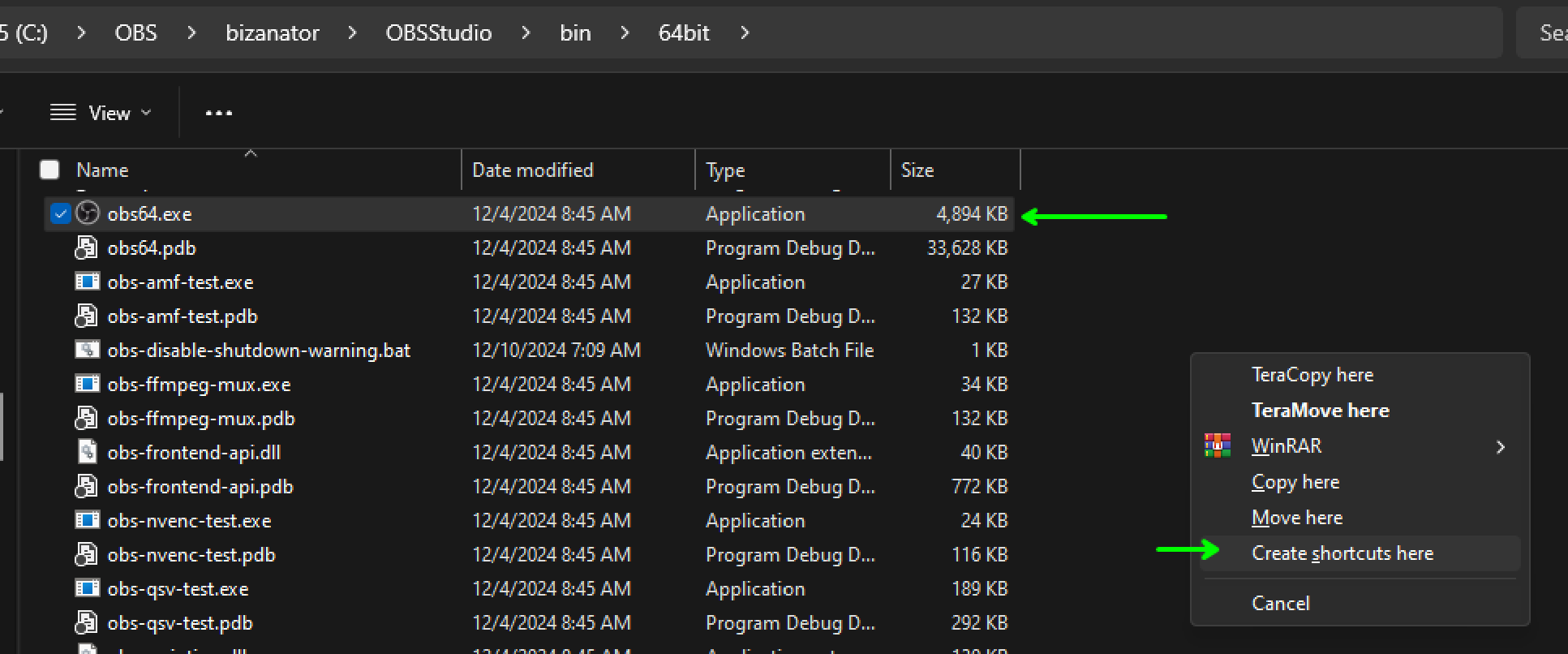
Find the sacred obs64.exe, right-click, and drag it into the realm of "Create shortcuts here." Like finding an epic loot drop in the middle of a heated Fortnite match.
-
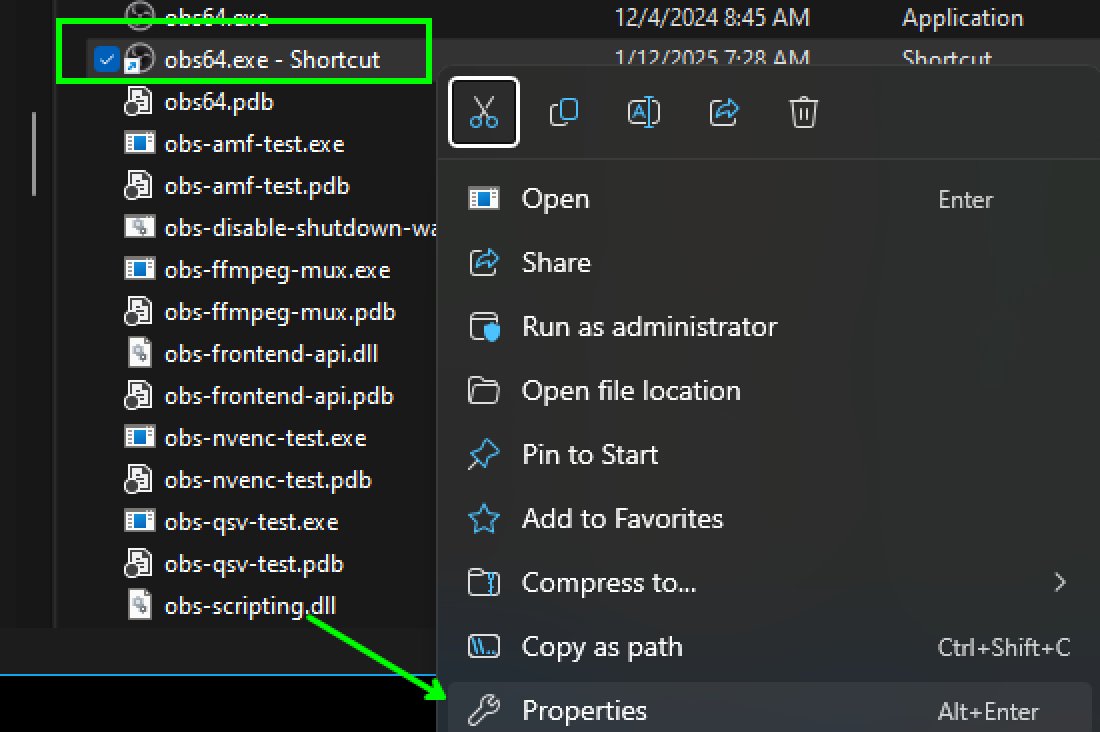
Behold, you've spawned an entity known as "obs64 - shortcut." Right-click this mystical being and select "properties."
-
Click the "Shortcut" tab and with the precision of a sniper, paste the following incantation:
C:\OBS\bizanator\OBSStudio\bin\64bit\obs64.exe --disable-shutdown-check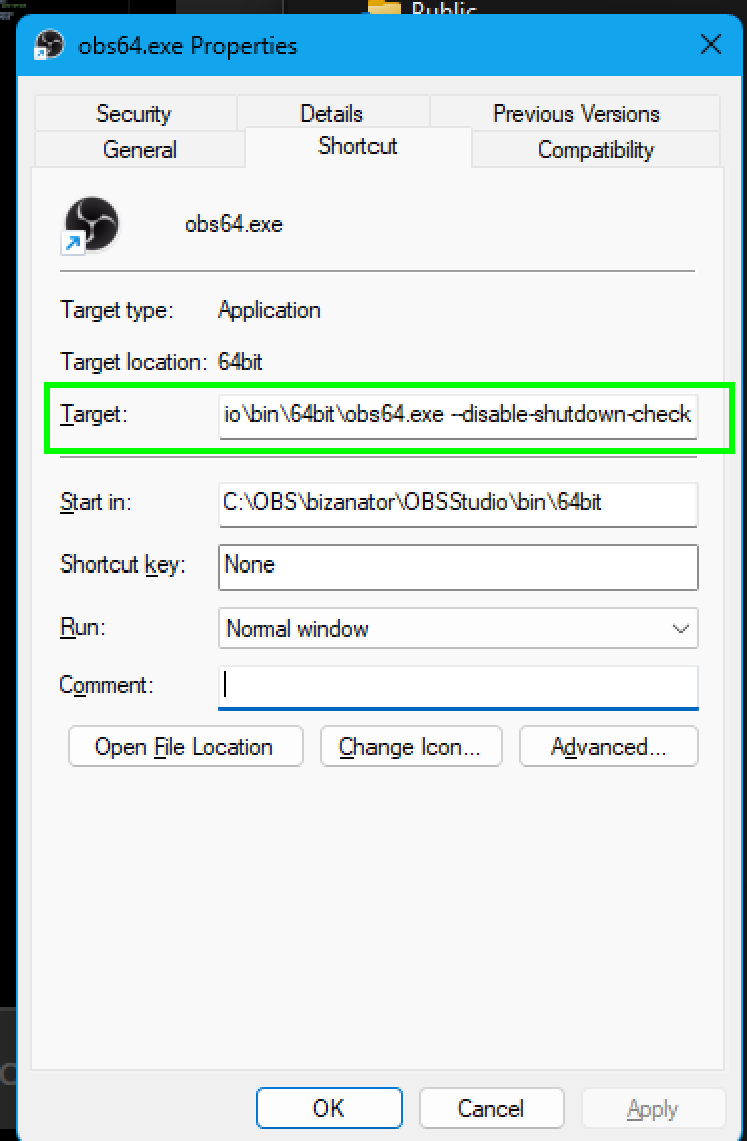
Remember, fellow spellcasters, no quotation marks "" , no `` – just the spell as it is. Otherwise, you'll summon...
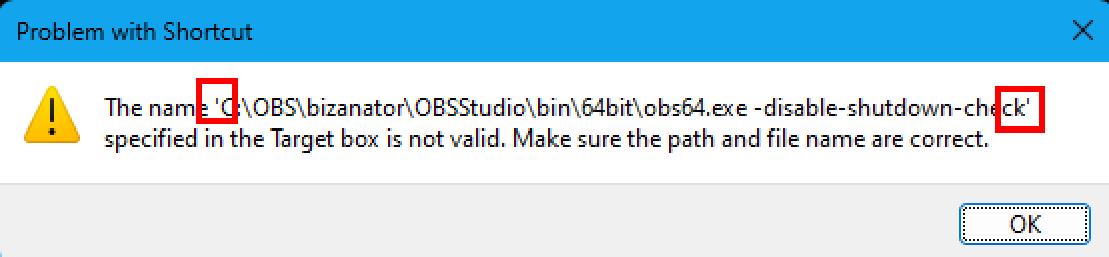
-
With the grace of a default dance, click "OK." Congrats! You've now got a magic portal that launches OBS without the nagging spirit of shutdown checks. Pin it to your start menu, clone it to your desktop, tattoo it on your arm – whatever floats your boat.
And there you have it, my gaming ghouls and tech witches! Happy streaming and may your frames be high and your latency low. Welcome to a world where OBS behaves more like a trusty sidekick and less like an unwanted party crasher. 🎮👻
Related Posts
Create Interactive UI: Verse Fields Events Now Available in UMG
Learn how to create UI widgets that trigger events in Verse using the new Verse fields event type in UMG.

BizaNator
Verse Function Renaming: The Art of Clean Code Through Smart Aliases
A comprehensive, humor-filled guide to function renaming in Verse, complete with backward compatibility tricks and practical solutions.
BizaNator
Network Adapter Survival Guide: Taming the Rebellious Marvell AQtion
A comprehensive, humor-filled guide to fixing the notorious Marvell AQtion network adapter issues, complete with Fortnite-flavored explanations and practical solutions.